March 26, 2026
Feature Enhancements
Restricted Maps Updates
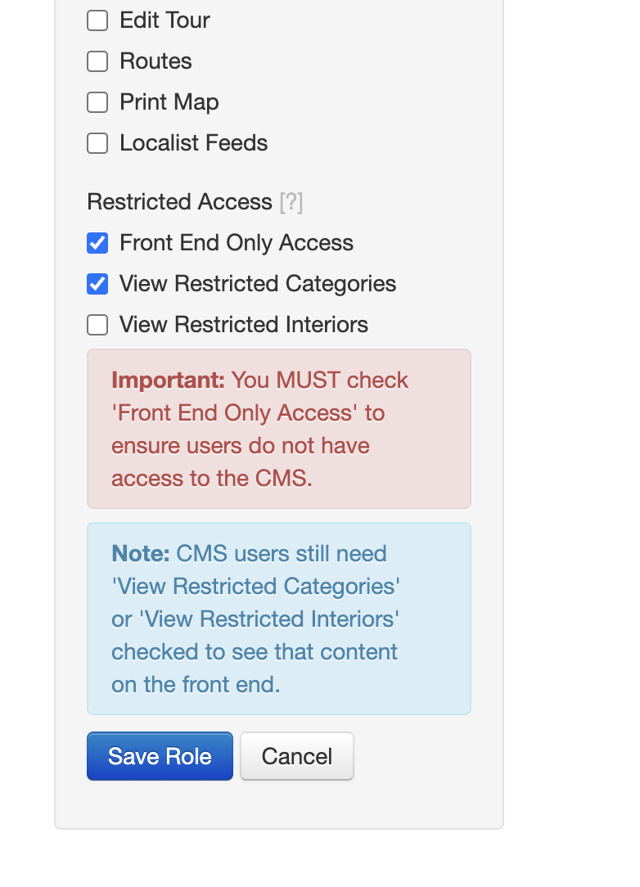
The Roles page in the CMS now separates CMS permissions from Restricted Access permissions into clearly labeled sections. "Front End Only Access," "View Restricted Categories," and "View Restricted Interiors" are grouped together with guidance text to help admins configure roles correctly. Previously, checking "Front End Only Access" hid all other permissions (not helpful), and restricted permission options appeared even when not enabled on the map (also not helpful).
Embedded maps can now hide the Sign In button. A new sih query parameter allows clients who embed their map in an iframe to hide the Sign In button on both desktop and mobile. This prevents a broken login experience in iframe contexts where authentication redirects may not work as expected. Existing restricted maps behavior is unaffected.
March 16, 2026
New Features
Display Location Names as Text on the Map
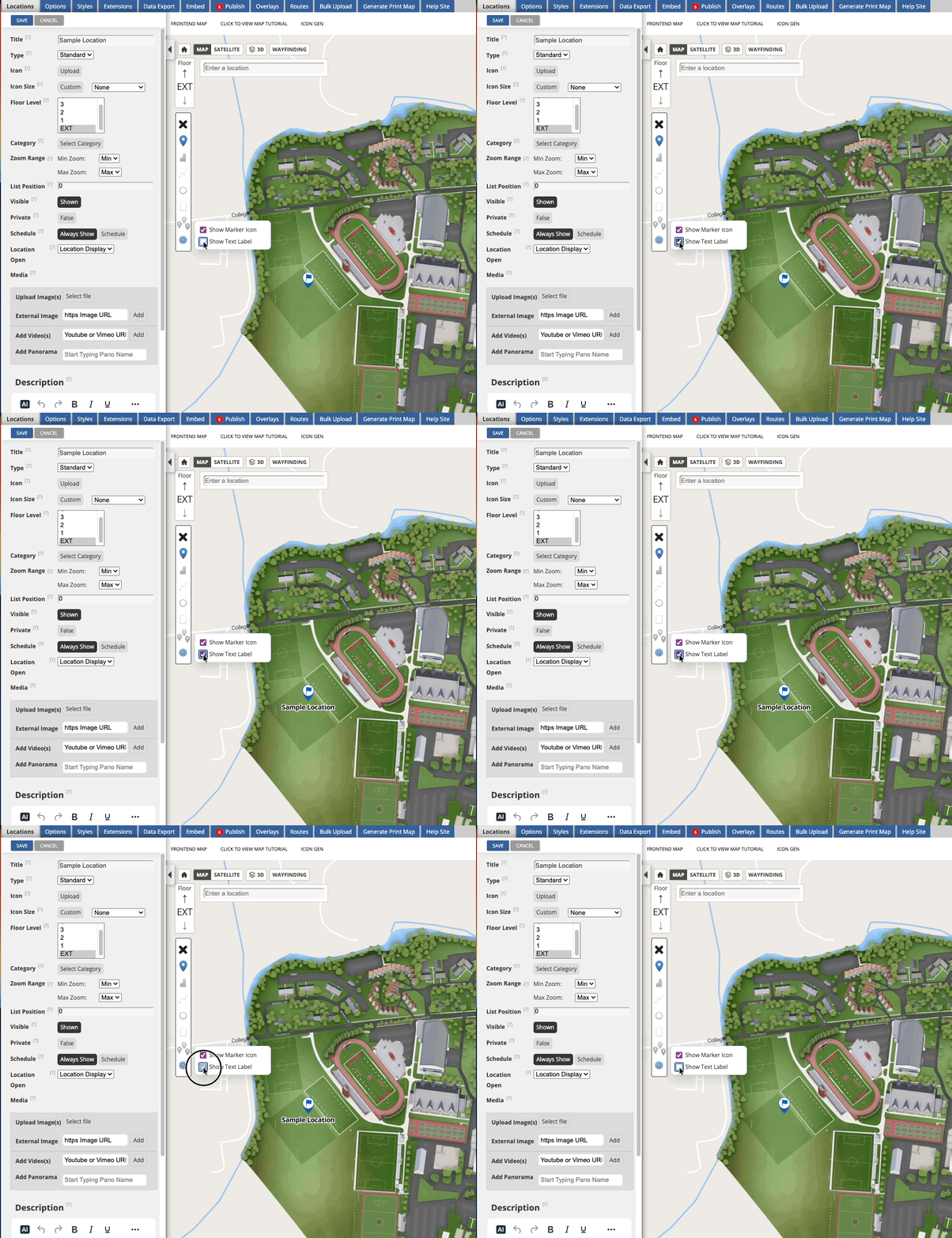
Map administrators now have more flexibility in how locations appear on the map. A new "Show Text" display option in the CMS location builder allows locations to be shown as their name in text, either on its own, alongside a marker, or on a polygon.
For locations where a simple text display is all that's needed, this reduces the overhead of managing additional display elements. This option is only available on OSM base maps.
SSO Login for Restricted Maps
End users can now sign in to restricted maps using their institution's Single Sign-On (SSO) rather than a separate Concept3D login. This creates a familiar, seamless login experience, especially for campus communities already signed in to their institution's systems.
- On content-restricted maps, a "Sign In" button takes users to the SSO login page.
- On fully restricted maps, users are automatically redirected to SSO.
- SSO users managed by an external identity provider can now access restricted categories.
March 5, 2026
Launching Restricted Content!
Previously, the Restricted Maps feature required placing an entire map behind a login. Recently, we launched Restricted Categories, and with this release, administrators can now control access more precisely by restricting all interior content.
Restricted Categories
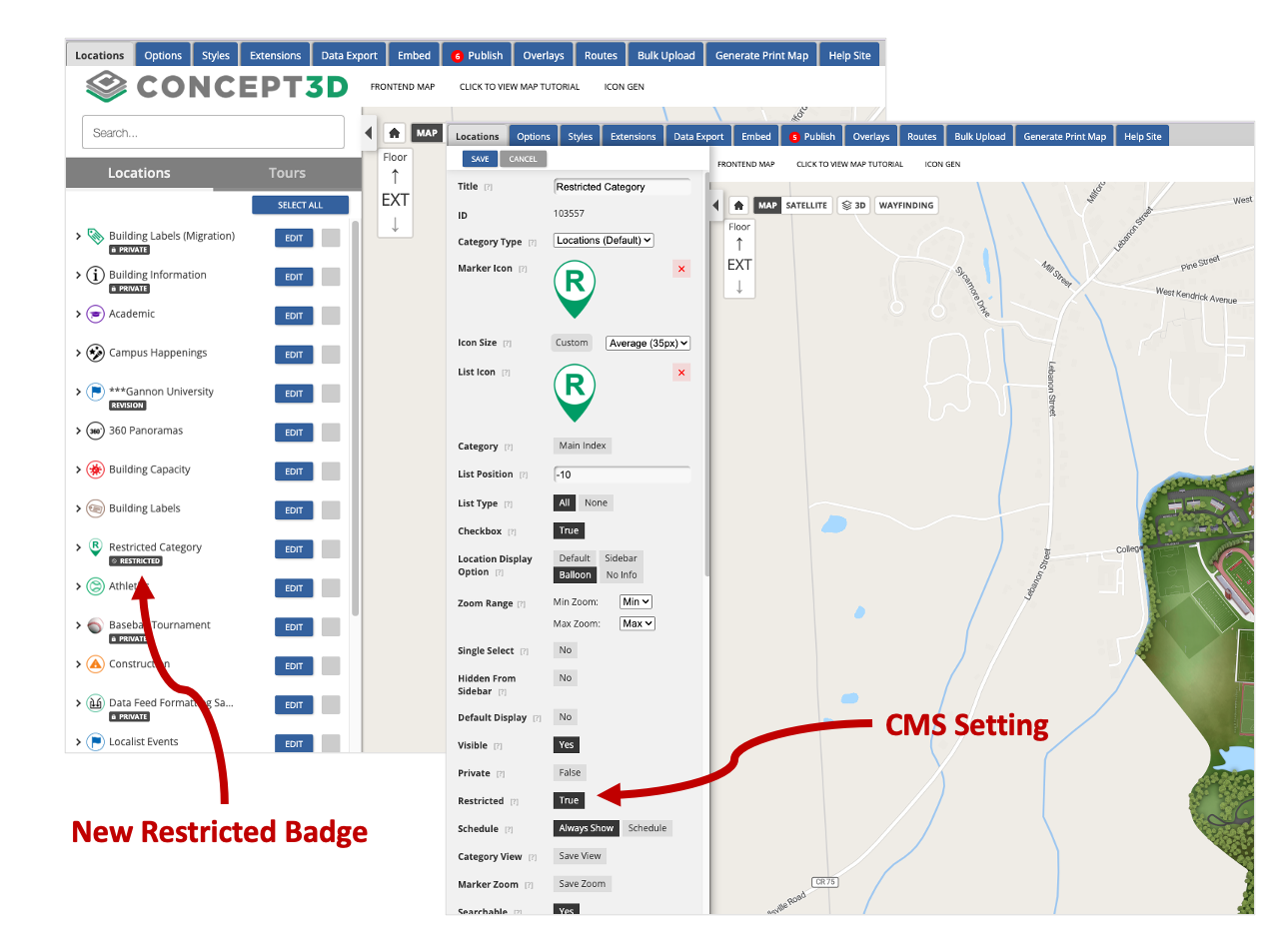
You can mark categories as restricted, which hides their locations from users who are not signed in. This allows organizations to keep certain places visible only to authenticated users while leaving the rest of the map open to visitors.
Restricted Interiors
Now, interior levels can also be restricted. When enabled, the level selector is hidden and anonymous users only see exterior (Level 0) content, while signed-in users can access interior floors and locations.
Interior content is hidden from the sidebar, search results, Wayfinding, and tour stops! Wayfinding will only generate exterior routes as well.
New Google Analytics 4 (GA4) events have been added to track authentication activity on the Interactive Map as well. These events include sign in, sign out, login success, and session detection. All Interactive Map GA4 events now include a new is_logged_in parameter, allowing administrators to segment analytics based on whether a user is authenticated.
Note: Restricted Content is an Advanced Feature that must be enabled for your map.
New Features
Dynamic Label Export
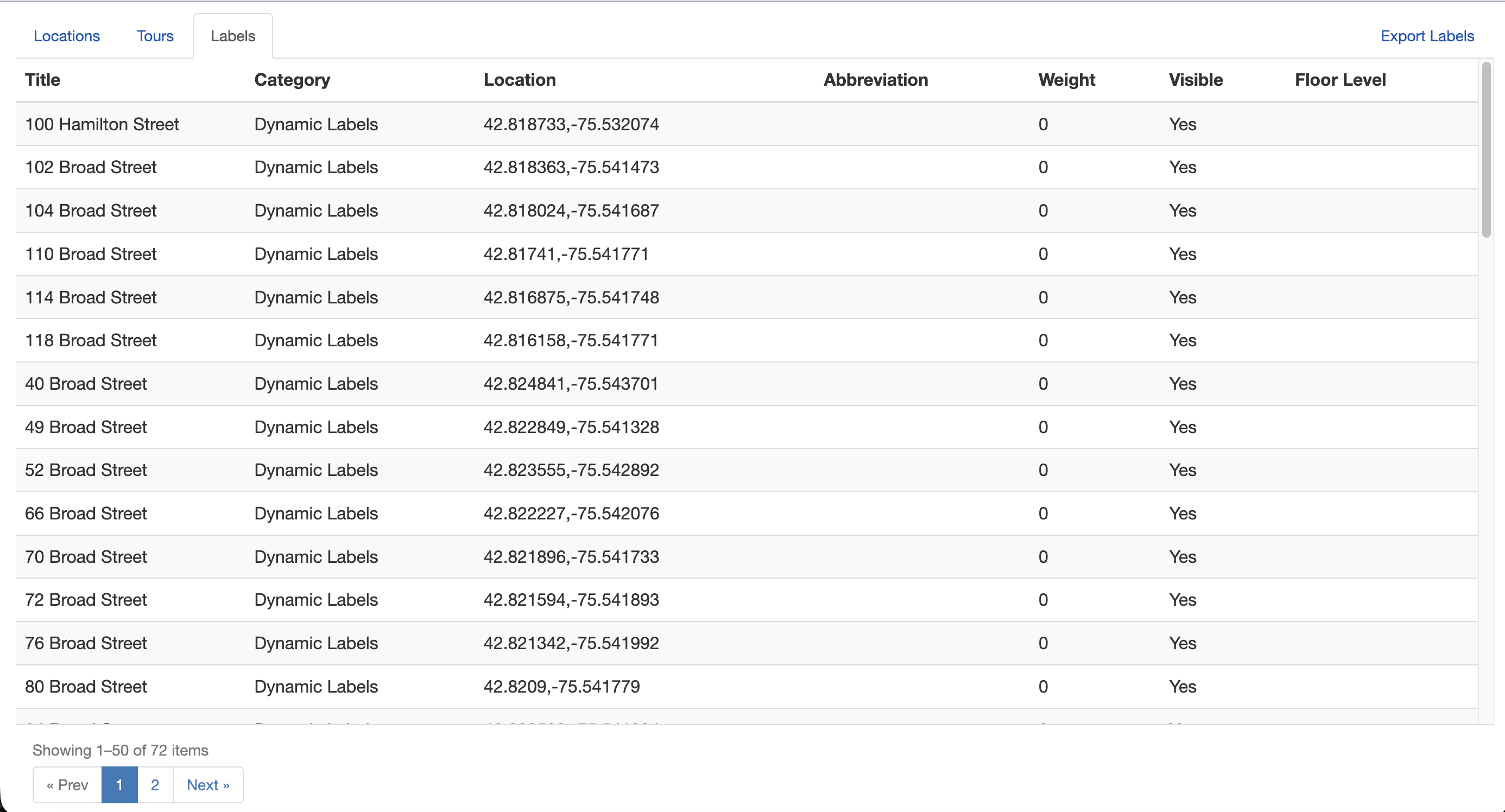
Map administrators using Dynamic Labels can now export their labels directly from the Data Export page in the CMS.
Exports use the same format as the bulk upload template, allowing labels to be edited and re-imported seamlessly. The Data Export page has also been updated with pagination and tabs for each data type to make navigating exported content easier.
Accessibility Updates
- Improved keyboard operability across the Print Map generator, ensuring all functionality can be accessed without a mouse.
- Added valid labels to form fields in the Print Map generator to meet WCAG 1.3.1, 2.5.3, and 4.1.2 requirements.
- Corrected the accessible name for the "Map" link in the Print Map output.
- Updated the ARIA label on the Directions sidebar close button for improved screen reader clarity.
Usability Updates
- Layer type orientation: Switching between 2D/3D and 360 display types now shifts the map orientation automatically. Selecting 360 tilts the map for an immersive perspective, while switching to 2D or 3D returns to a top-down view.
- Updated CMS default icons: The default marker and list icons in the CMS have been updated to match the current front-end icon set.
- Saved Places: Multi-Level Pin Context: Saved places (custom locations) now remember the building floor or level where they were placed. When a user opens or shares a saved place inside a multi-level building or stadium, the map automatically navigates to the correct floor instead of requiring manual level switching.
February 20, 2026
New Features
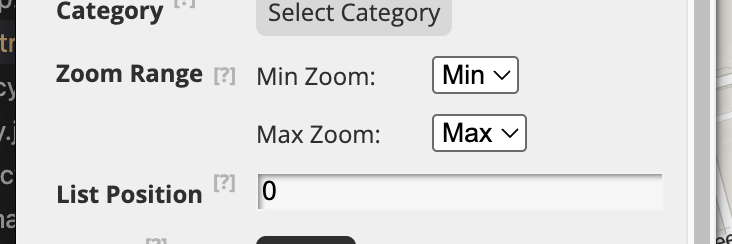
Control Exactly When Markers and Labels Appear with a new Zoom Range Display
CMS administrators can now set a minimum and maximum zoom level for categories and locations, giving precise control over when markers and labels appear on the map. This replaces the previous "greater than / less than" options with a new "Range" setting. The zoom range applies to both category-level and individual location settings. The location setting will override the category setting.
Introducing Restricted Categories!
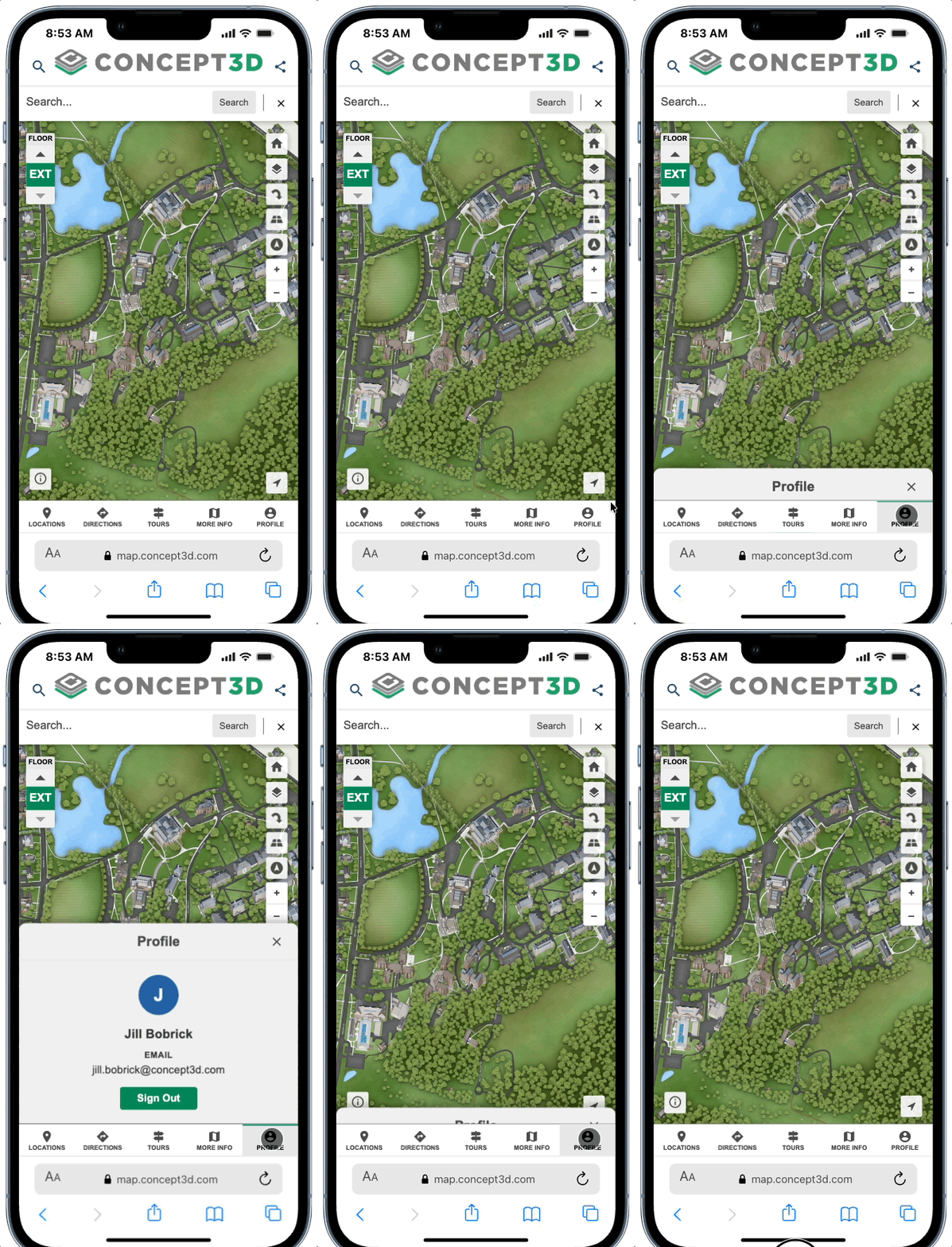
Maps can now have categories that are only visible to signed-in users, giving organizations control over sensitive or role-specific content. Locations in restricted categories are hidden from search results and wayfinding for unauthenticated users. To access restricted content, users can sign in via a "Sign In" button in the map header on desktop, or from the bottom bar on mobile — once authenticated, it becomes a "Profile" button with the same experience across both platforms.
Restricted Content is available as an add-on subscription. This is just the beginning — Restricted Interiors and SSO Login pages are on the way.
The new mobile sign in option is also an update for current Restricted Maps!
Smarter Parking Spot Saving
When saving a parking spot, the location pin now defaults to the user's current location instead of the map center, matching the behavior of apps like Google Maps.
January 26, 2026
Coming Soon: Restricted Content on Maps
We’re excited to share that Restricted Content for maps is almost here. This long-requested feature allows map administrators to require users to log in before viewing certain map content, helping protect sensitive information. A lot of the CMS and backend work for this has been released (so you may see a setting or two along the way…) Watch release notes for updates!
New Map Display Toggle
Maps now have the option to include a new toggle in the map layer selector (the same control used for Map/Satellite) that lets users switch between different default base map views, such as 2D, 3D, and 360º Maps.
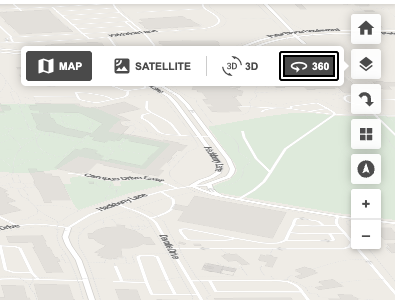
This makes it easy to move between available map experiences—for example:
- Switching between a 3D rendering and a 360 map
- Switching between a 2D rendering and a 3D rendering
The map automatically updates to display the appropriate view when a different option is selected.
Some things to note:
- Clients need to purchase different base rendering types to have this option. This comes with an additional setup fee if not already purchased.
- Only the view types enabled for a map will appear as options in the toggle. So customers without 360º Maps will not see the 360º Maps toggle option.
- The default map view is set in the CMS, but end users can change the view at any time using the map control.
- This toggle applies only to base map layers and does not affect interior renderings.
Why Offer Multiple Display Options
- Providing multiple map display types allows you to support a wider range of user needs—but it is entirely optional.
- Important: Clients do not need to enable multiple display options. Most clients choose a single map display type (2D, 3D, or 360º Maps) and present that as the sole experience for their users.
- Clients might choose to enable multiple displays only if you want to give users additional flexibility, such as:
- Switching between a simple view (2D) and a more visual view (3D) based on preference
- Starting with a clear, lightweight map and moving to richer context when needed
- Exploring the same space at different levels of detail
Google Analytics (GA4) Event Tracking Updates for Map
We’ve improved how map interactions are tracked in Google Analytics to make reporting more accurate and consistent across tours, locations, and map controls.
What’s changed?
-
New event:
tour_stop_view
Fires when a tour stop loads, allowing tour engagement to be tracked separately from standard location views, providing clearer insight into tour engagement without inflating location view metrics. -
Updated event:
maximize_location
Now fires consistently on both desktop and mobilewhen a user maximizes a location, improving cross-device reporting. -
Updated event:
open_directions
Now fires when directions are opened from a transit stop balloon, providing more accurate directions-related metrics. -
Updated event:
marker_open
Fires when a user opens a location via a marker or the sidebar. This event no longer fires when a location is opened via a tour stop. -
Updated event:
external_tour_open
Tracks when a user opens a tour that links to an external URL. (Previously tracked as the eventtour_open.) -
New event:
toggle_pitch
Tracks user interaction with the 360 map Toggle Pitch control.
Improved Parking Spot Menu Options for Saved Places
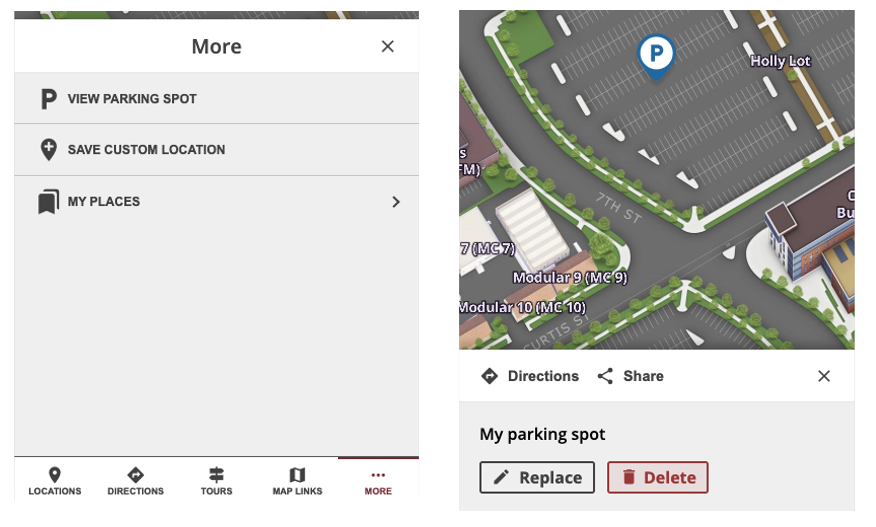
The bottom menu now displays 'View Parking Spot' instead of 'Replace Parking Spot' once a parking location is saved. Selecting this option opens your saved parking spot. To update your parking spot, use the new 'Replace' button available directly on the parking spot sheet. No changes have been made to how the initial parking spot is saved.
Accessibility & Usability Updates
Prevent Data Loss When Editing Tours - When editing a Map Tour in the CMS, clicking on a Dynamic Label or other map objects that would normally navigate away is now blocked. If you attempt this action, a message will appear prompting you to close the Tour editor first, preventing accidental loss of unsaved work. This helps ensure your ongoing edits are protected from interruptions.
Improved Keyboard Navigation in Share Dialog - Non-interactive elements in the Share dialog, such as the “Share on Social Media” heading and the address block, are now excluded from keyboard tab order. This change ensures that only interactive controls receive keyboard focus, making navigation smoother and more accessible for users who rely on keyboard navigation.
January 16, 2026
Designate Preferred Parking
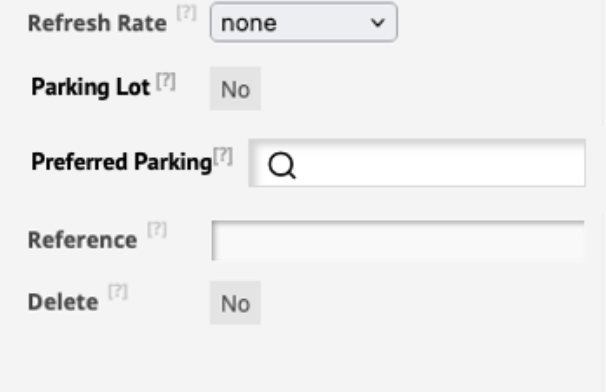
It’s now possible to designate preferred parking allowing users to navigate to selected parking areas. A toggle has been added to location settings that allows users to identify a location as a parking lot. When creating or editing a location, a new "Preferred Parking" field enables you to search for and select from published parking lots, ensuring users are routed to the appropriate lot when using driving directions. Only one designated parking lot can be assigned per location, but each parking lot can be associated with multiple locations. Attempting to delete a parking lot that is in use will prompt an error message listing all locations that currently use it as preferred parking.
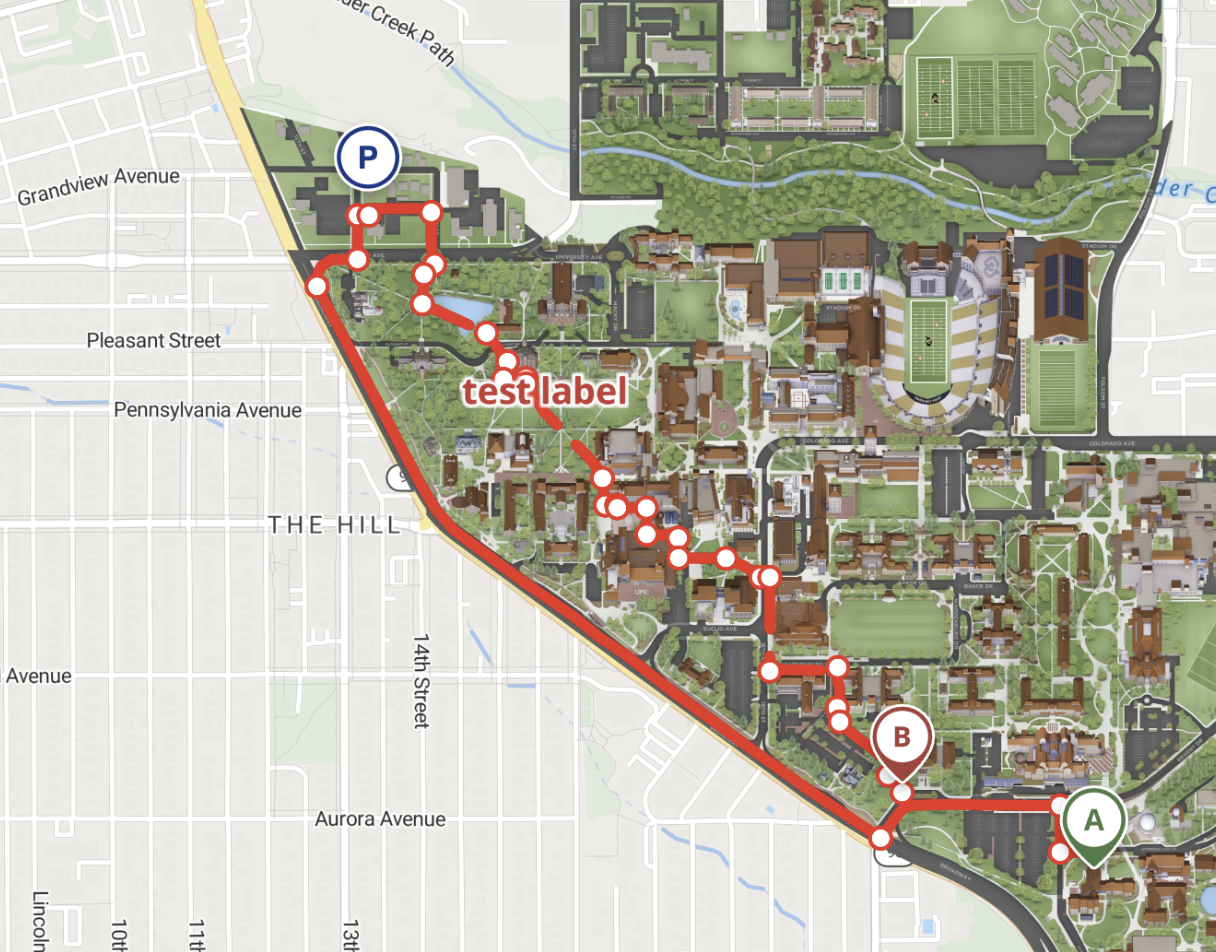
When searching for a location on the interactive map that has a designated parking lot, driving directions will now guide you to that specific parking lot instead of the main building entrance. This improvement ensures more accurate arrival points for users who drive to their selected destinations.
Improved MultiPolygon Viewing in Location Builder
MultiPolygon shapes can now be viewed directly in Location Builder, not just from published data but also from revision drafts. Users can view, edit, save, and publish MultiPolygon shapes. The revisions table now includes additional columns to support these complex geometries, making it easier to manage location data with multiple areas.
Improved Overlay Assignment for 2D / 3D / 360 Map Types
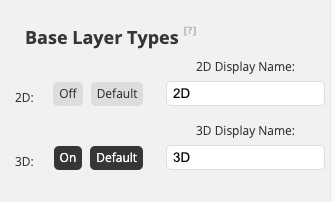
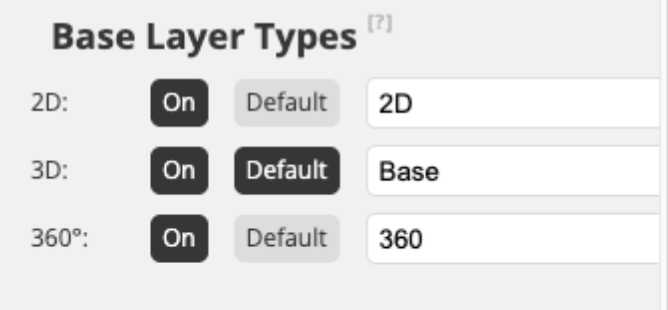
Overlay assignment in the CMS now supports selecting one or more map layer types (2D, 3D, 360) for each overlay, including a required default layer type. Admins can customize the toggle label for each layer type (up to 15 characters). The layer selection button will appear in the CMS when multiple layer types are enabled, allowing for more flexibility in map experience customization. Each project can set an optional display name for toggles and choose a default layer to display.
Improved Tours Tab for Empty States
When there are no map tours added in the CMS, the Tours Tab now displays an empty state message: “You have not created any Map Tours!” along with a clear call-to-action to add a tour, making it easier for users to get started.