June 26, 2026
Feature Enhancements
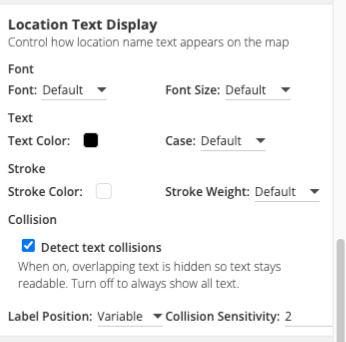
Marker Label Placement and Text Styling
CMS Admins now have new controls over how location and marker labels look and behave on the map.
- A new Location Text Display section in the Styles tab sets label font, text color and case, and stroke, and controls how labels handle crowding: labels can stay in a fixed position or reposition dynamically to avoid overlap, with adjustable collision sensitivity.
- The same placement and collision controls are now available for Dynamic Labels. Existing maps are unchanged by default, so the new settings can be adopted whenever an editor is ready.
New Location Types
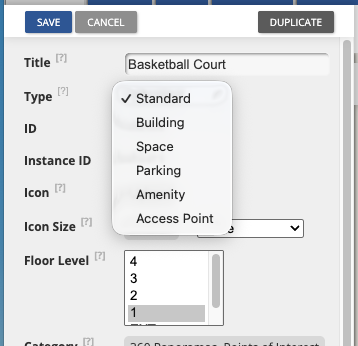
Locations can now be classified with four new types: Building, Space, Amenity, and Access Point, adding to the existing Standard and Parking types. This gives editors a clearer, more consistent way to describe what is on the map, whether it is a building footprint, a bookable space, an amenity like a water fountain, or an accessible entry point.
The new types are available everywhere locations are managed—in the CMS, through CSV import, and via the API—so classifications stay consistent across every workflow. Richer types make it easier to organize, find, and present locations, and they lay the groundwork for more type-based functionality coming soon.
Bulk Edit
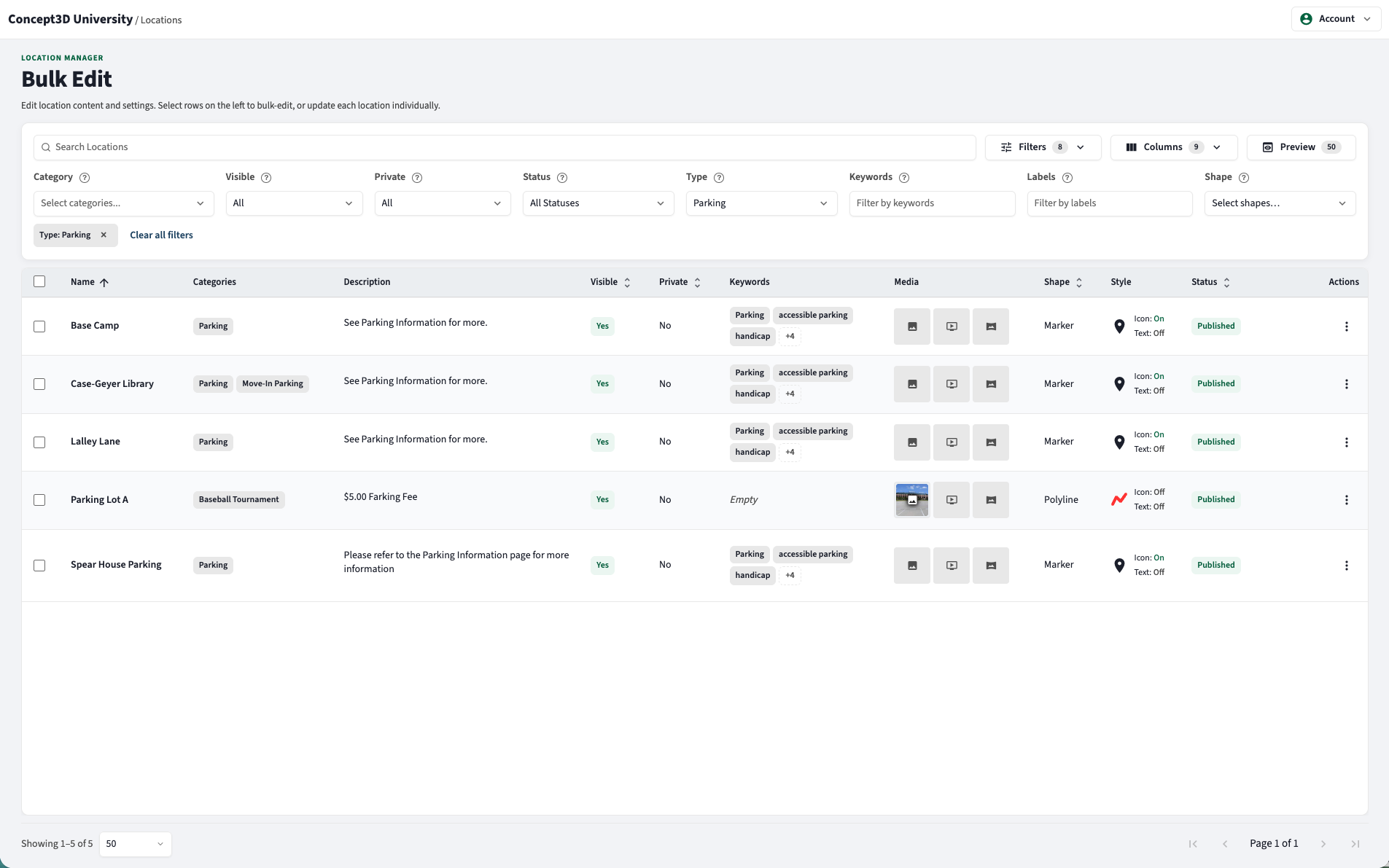
Editing large sets of locations is now faster and safer.
- The Location Manager and Bulk Edit interface has received some design polish, setting the stage for more CMS updates to come.
- Editors can filter and bulk-edit locations by type, including the new location types, and update many locations in a single action.
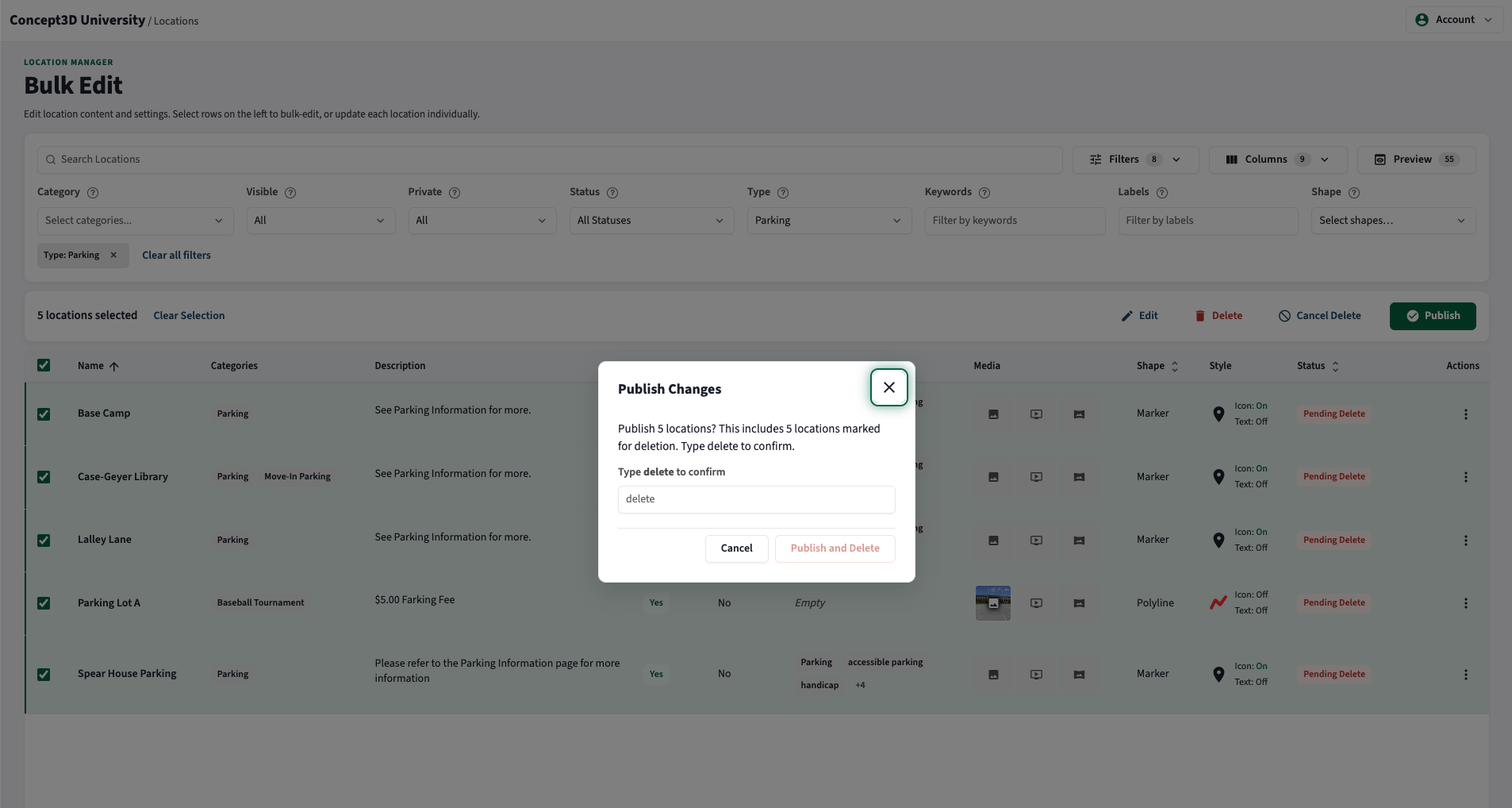
- Bulk deletions now include a review step before they publish, making big changes easy to double-check, and the experience now matches the current CMS design.
Usability Updates
Location shapes created from data feeds can now display an icon, making them easier to spot and identify on the map.
May 28, 2026
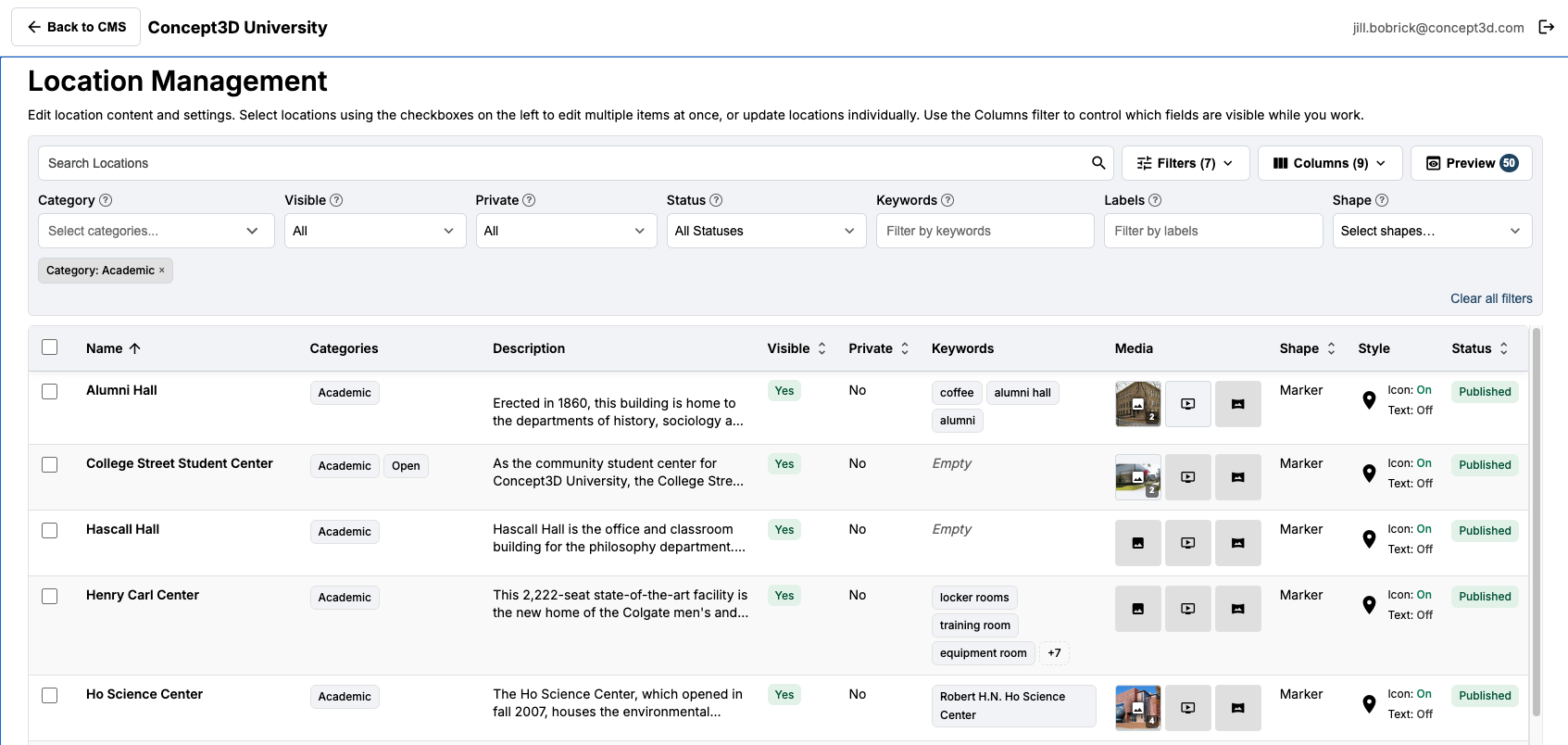
It’s here! Location Manager with Bulk Edit
What used to take hours…. now can take minutes!
Partners now have a new Location Manager in the CMS, reachable from a new Bulk Edit button. It provides a single, table-based workspace for viewing, filtering, and editing many map locations at once instead of one at a time, making large location updates faster and easier to manage. Common details such as names, media, scheduling, and visibility can be edited in bulk.
Access is governed by a new bulk edit permission. All partners with the Admin role have access by default across both existing and new maps. As part of this change, the previous Bulk Edit tab on the account page has been removed, and bulk editing is now centralized in the Location Manager.
For more information, check out these help articles!
Accessibility Updates
- The floor selector is now contained within a properly labeled ARIA (Accessible Rich Internet Applications) landmark, improving navigation for partners and visitors using screen readers and other assistive technology.
April 30, 2026
Feature Enhancements
Larger Marker Icons (up to 200px)
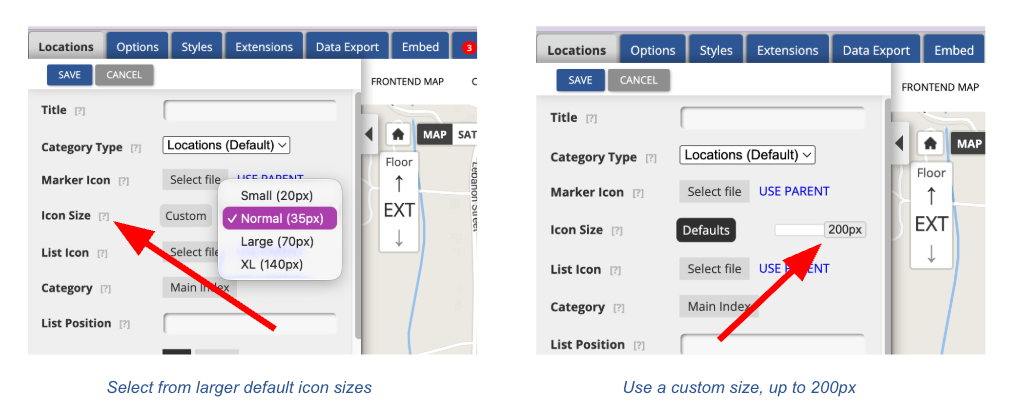
Partners now have far more creative range for branding and visual hierarchy on the map. Custom marker icons can be sized up to 200px, a meaningful jump from the previous 80px cap, giving partners the flexibility to design bolder, more legible markers that hold up at higher zoom levels and in print. The front-end map automatically fetches the appropriately sized asset based on the icon size set on the location or category, so hover and zoom interactions stay crisp at the larger sizes. This work also set the stage for sharper print map icon scaling.
Action required to take advantage of this feature: Existing marker icons were generated against the previous 80px cap and will not scale up cleanly. To benefit from the expanded sizing range, partners will need to reupload their marker icons at the new higher resolutions. To update, Partners can take advantage of our default marker icons or use the icon creator to make their own.
Custom HTML in the CMS Footer
Partners now have full control over what lives in the CMS footer, including the ability to embed iframes, widgets, and other dynamic third-party content. This unlocks new ways to extend the value of the map experience. Content entered in the CMS footer field renders globally across the front-end map without being stripped on render.
As a reminder, the Map Footer is a desktop-only feature.
Static Map Performance Optimization
Static map requests now load tiles and renderings in parallel rather than sequentially, significantly reducing load times for partners using static map endpoints. Additional logging was added to support faster diagnosis and future optimization work.
Map Boundaries Section in the CMS
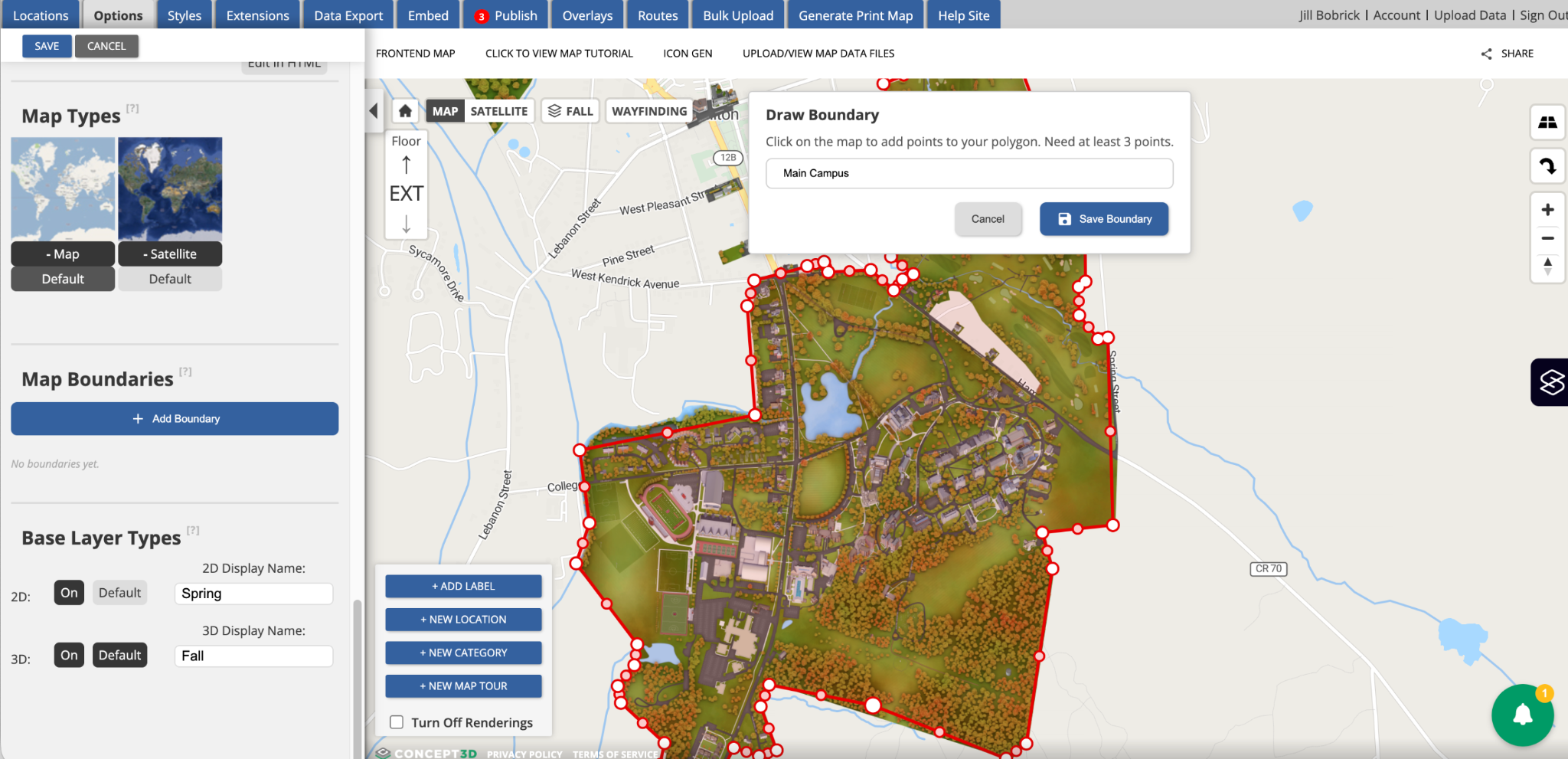
Partners can now define and visualize their Map Boundary within a dedicated, global setting in the CMS, located in the Options sidebar, Map managers can:
- Draw polygon boundaries directly on the map by clicking points
- Save boundaries with custom names and refine them by dragging vertices
- Toggle boundary visibility from the map view
- Maintain multiple boundaries per map
Until now, boundary-like configuration was handled implicitly through category displays for rendering setup, with no dedicated place to define the geographic areas a partner controls and maintains. By introducing Map Boundaries as a global setting, we are establishing the foundation for new capabilities that depend on the partner's authoritative campus footprint, including Wayfinding and 3rd party directions handoff and AI-generated content scoped to partner-owned areas.
In this release, boundaries display only within the CMS. Downstream applications will be enabled in future releases as the dependent features come online.
API Documentation Improvements
The API (Swagger) documentation has been comprehensively overhauled with full query parameter coverage, complete response schemas with examples, documented error responses, and clearer authentication documentation across API key, OAuth/Keycloak, and preview token methods — making it a faster, more accurate reference for partners and integrators building against the API. Ask your Partner Success Manager for access if needed!
Usability Updates
A set of refinements aimed at making the CMS faster, clearer, and less frustrating for the admins who spend the most time in it.
- Consistent Yes/No labels across the CMS. Updated toggles on the Edit Category and Edit Location screens are now standardized to Yes/No, replacing the inconsistent True/False and Shown/Hidden labels. Tooltip help text was updated to match. Less cognitive overhead, fewer surprises.
- Consistent print map marker sizing across resolutions. High-resolution print maps now keep markers at a readable size rather than shrinking them, so partners get usable print outputs regardless of resolution.
- Polished Publish > Labels tab. Checkbox alignment and delete button positioning now match the Content tab, giving the Publish workflow a cleaner, more cohesive feel.
Accessibility Updates
Continued investment in making the Interactive Map work for every visitor, including extensive remediation of audit findings against WCAG 2.2 AA.
Print Map Generator WCAG 2.2 AA Remediation
A focused round of work that materially improves the experience for keyboard and screen reader users generating print maps:
- Visible focus and keyboard operability on the map canvas. The map canvas now has a visible focus indicator, and keyboard focus moves to a meaningful element after pressing Generate Print Map.
- Status announcements for screen readers. The Coordinates button announces a status message when activated, and print map generation progress is announced via an aria-live region.
- Programmatic grouping of form steps. Each form step in the print sidebar is wrapped in a fieldset with its legend, so screen readers announce the step context when a user enters a group.
- Proper dialog semantics on the shared confirmation modal. The dialog now has correct role, aria-modal, accessible name and description, and a clearer close button label.
- Non-modal print sidebar. The print sidebar now allows simultaneous interaction with the map, and its close control is a native button with proper focus management.
Mobile and Front-End Map Accessibility
Improvements that make the mobile map experience more navigable for keyboard and screen reader users:
- Mobile wayfinding focus management. Focus moves to the Options header or Close button when the Options panel opens, with a focus trap inside the panel.
- Restored focus indicators and accessible names on mobile action controls.
- Mobile skip links are no longer hidden by aria-hidden.
- Search button has an updated meaningful accessible label.
April 15, 2026
New Features
AI Functionality Toggle
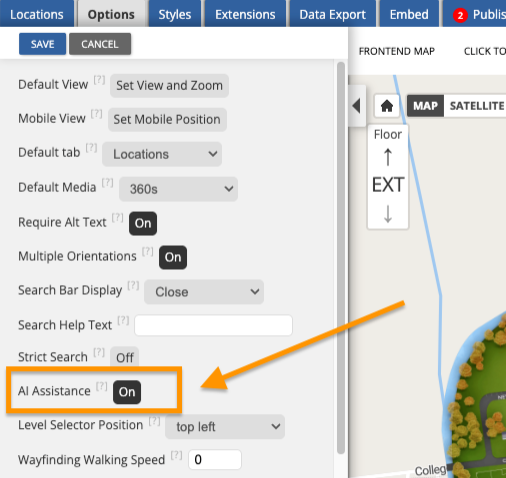
Partners now have full control over AI-powered tools in the map's CMS. A new "AI Assistance" toggle in the CMS options panel lets teams turn AI features on or off at any time, including AI-assisted writing for location descriptions and AI-generated alternative text for images.
Whether an institution is ready to embrace AI tools today or prefers to wait, the choice is theirs. AI is enabled by default on all maps, so there is nothing partners need to do to keep using it. And as Concept3D continues to invest in AI across the platform, new capabilities will be available through this same toggle, making it easy to stay in control as the product evolves.
If the AI Assistance toggle is not visible in the CMS options panel, it may need to be enabled for the map. Partners should reach out to their Partner Success Manager to have it turned on.
Accessibility Updates
Print Map Generator: WCAG 2.2 AA Compliance Improvements
We've made significant accessibility improvements to the Print Map Generator, addressing over 90 findings from a comprehensive WCAG 2.2 AA audit. Screen reader and keyboard users will notice a meaningfully better experience across the Print Map sidebar, including properly announced dropdown menus, correctly labeled checkboxes, improved color contrast on interactive elements, and keyboard-navigable tabs. These changes bring the Print Map Generator closer to full WCAG 2.2 AA compliance, with additional improvements on the way.
Improved Focus Management for Location and Transit Balloons
Opening and closing location balloons, transit balloons, and building or room information dialogs now behaves more predictably for keyboard and screen reader users on both mobile and desktop. Focus moves into overlays when they open and returns to where the user left off when they close, reducing confusion and making the map easier to navigate without a mouse.
April 8, 2026
Feature Enhancements
Configurable Alt Text Requirements
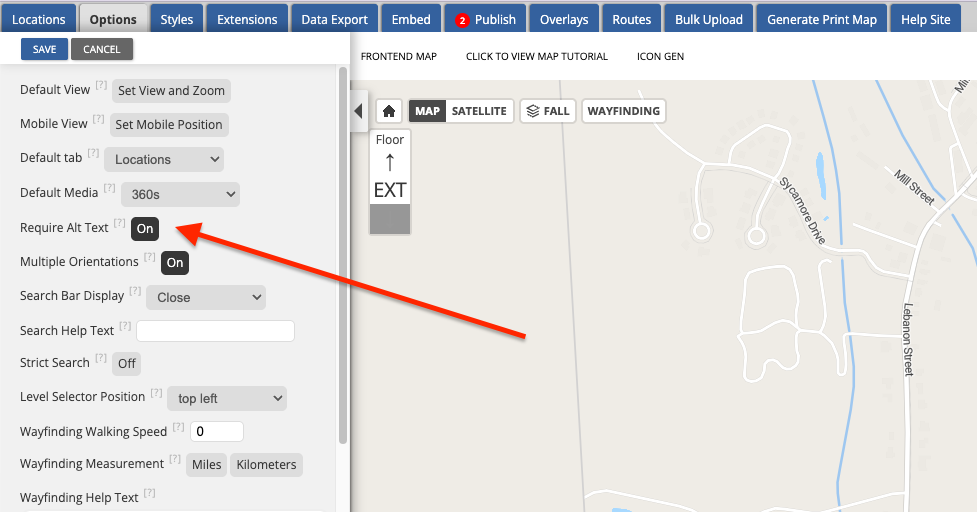
Map administrators now have more control over how alt text is enforced on location images. A new "Require Alt Text" toggle on the Options tab lets administrators decide whether alt text should be required before a location can be saved. When enabled (the default and suggested implementation), the CMS continues to require alt text on all images, just as it does today. When disabled, locations can be saved without alt text, though a non-blocking warning will still alert users when alt text is missing.
Bulk Import and Export Now Supports Location Type and Preferred Parking
The bulk import and export workflow now includes support for location types and preferred parking assignments. Exported files include a new "Type" column (standard or parking) and a "Preferred Parking" column. Bulk imports accept the optional "Type" column, defaulting to "standard" when omitted. The bulk import template has been updated.
For maps that use Preferred Parking, the exported "Preferred Parking" column shows which parking location is assigned to each destination. This makes it easier to audit and manage parking assignments at scale, especially for campuses with large numbers of locations.
Usability Updates
- Renamed "Show Text Label" to "Show Marker Text" in the marker and polygon editor to better distinguish marker display text from the Labels.
April 1, 2026
Usability Updates
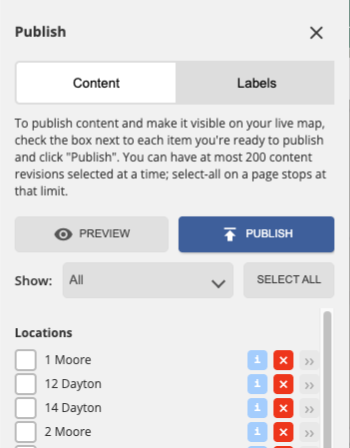
Publish tab now supports pagination. Maps with a large number of revisions previously cut off after a certain scroll point, preventing access to older revisions. The publish tab now paginates at 200 revisions with persistent selections across pages, making it easier to manage publishing on maps with extensive revision history. With the new “show” filter, users can easily drill down revisions to just locations, categories or other areas of the CMS (styles, options, routes)
- Label editor no longer triggers location clicks. Previously, clicking on the map to place a label could accidentally open an underlying location's editor, pulling users out of the label creation workflow. Location click interactions are now disabled while the label editor is open.
Accessibility Updates
- Fixed an issue where the MapTiler attribution logo on OSM base maps included an unsupported ARIA attribute, which was flagged by accessibility scanning tools.
- Fixed an issue where the search results listbox referenced a missing label element, causing screen readers to announce the list without a proper accessible name.