December 10, 2025
New Features
Multi-Space Reservations
Event Coordinators can now manage complex events that require multiple spaces to be reserved for a single event. This feature streamlines the coordination of large campus events like homecoming, performing arts, and conferences by allowing admins to view, track, and update multiple space reservations as a single unit and event. Multi-space functionality provides visibility across all locations and dates for an event while staying flexible to adjust reservations as new things pop up. Updates that went live with this new feature:
- Add new reservations to existing reservation groups for different spaces with real-time availability checking
- Quickly understand if reservation groups have “multiple spaces” or “multiple buildings” reserved
- See which Buildings and Spaces are reserved at specific dates and times in reservation groups
- The first space’s photo displays on reservation cards for visual reference
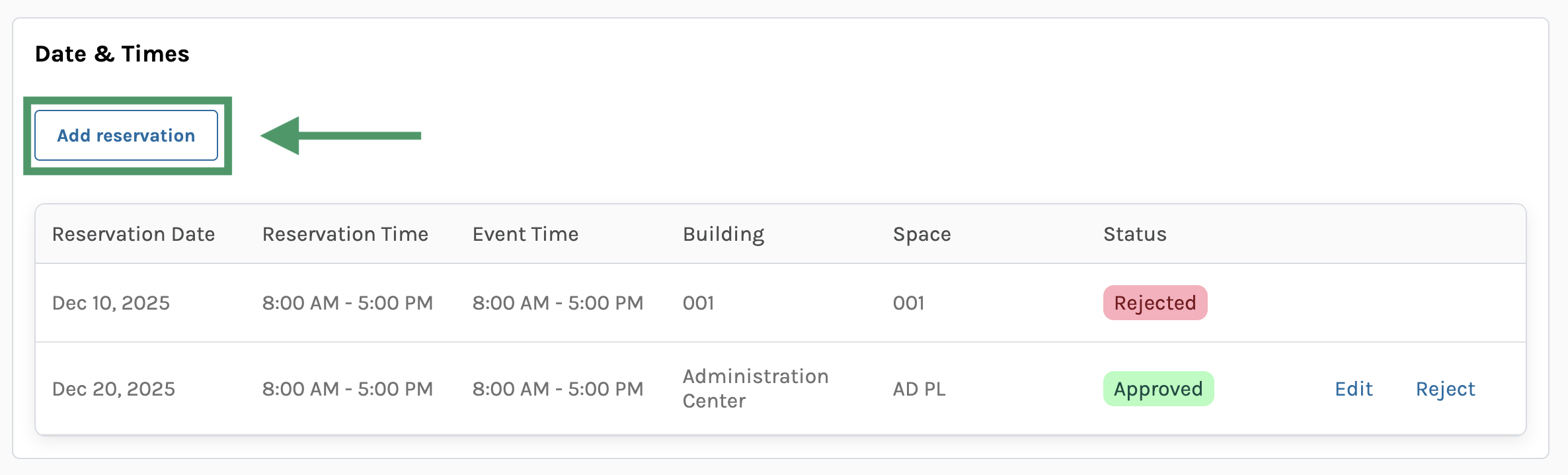
Admins now can add a new reservation to an existing reservation group.
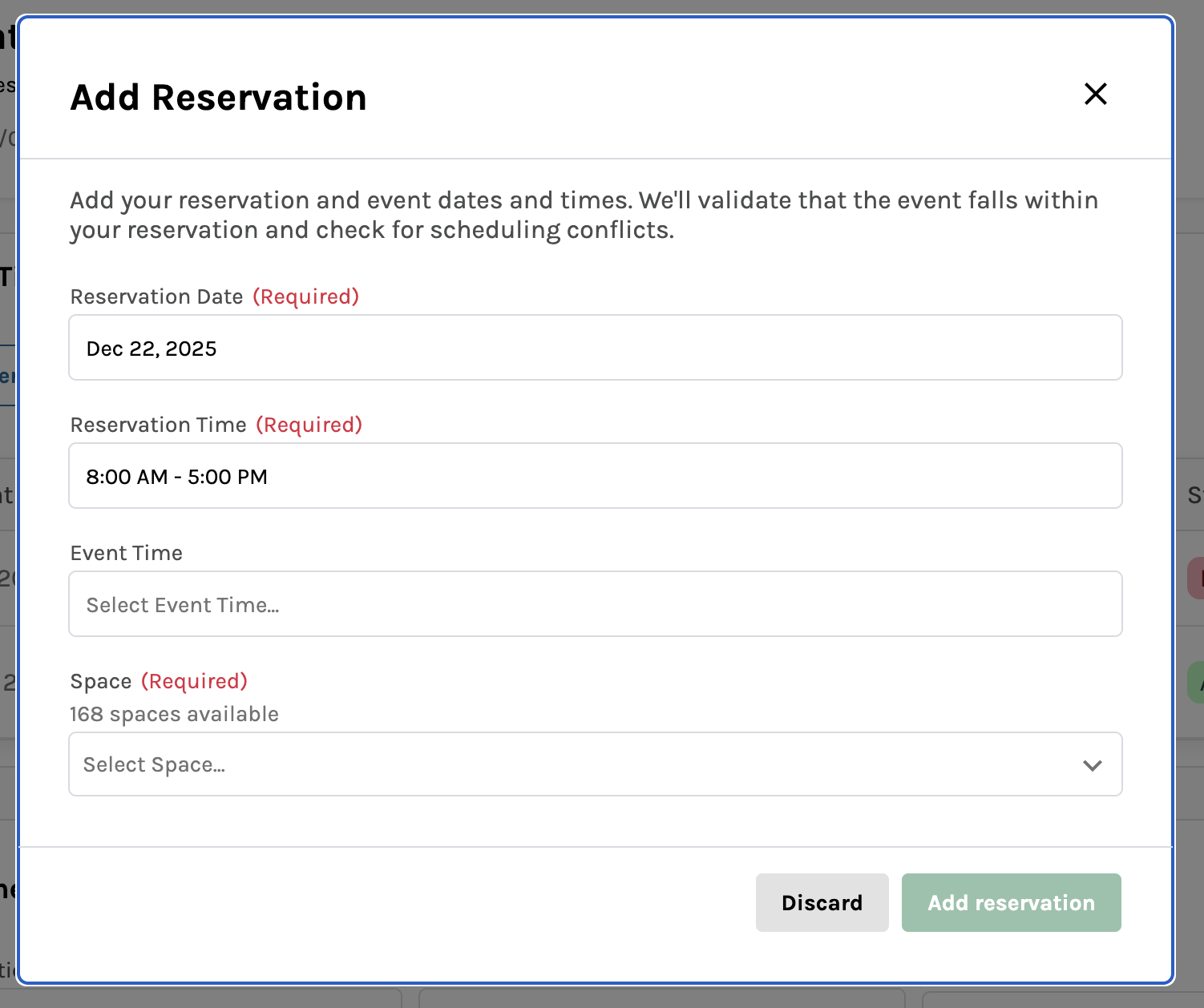
Only available spaces can be booked and added to existing reservations.
Support for Single Sign On (SSO)
Room Reservations now supports Single Sign On (SSO), allowing users to access the platform using your institution’s credentials. Users can log in seamlessly through your authentication system without needing to create or remember separate Room Reservation passwords. This integration provides a more streamlined experience for students and staff on campus:
- Log in directly through your institution’s authentication system
- Access Room Reservations using the same credentials you use for other campus systems
- Simplified user onboarding with automatic account provisioning from your institution’s authentication system
-
Secure authentication that respects your security policies and requirements
November 18, 2025
New Features
Operation Schedule Report
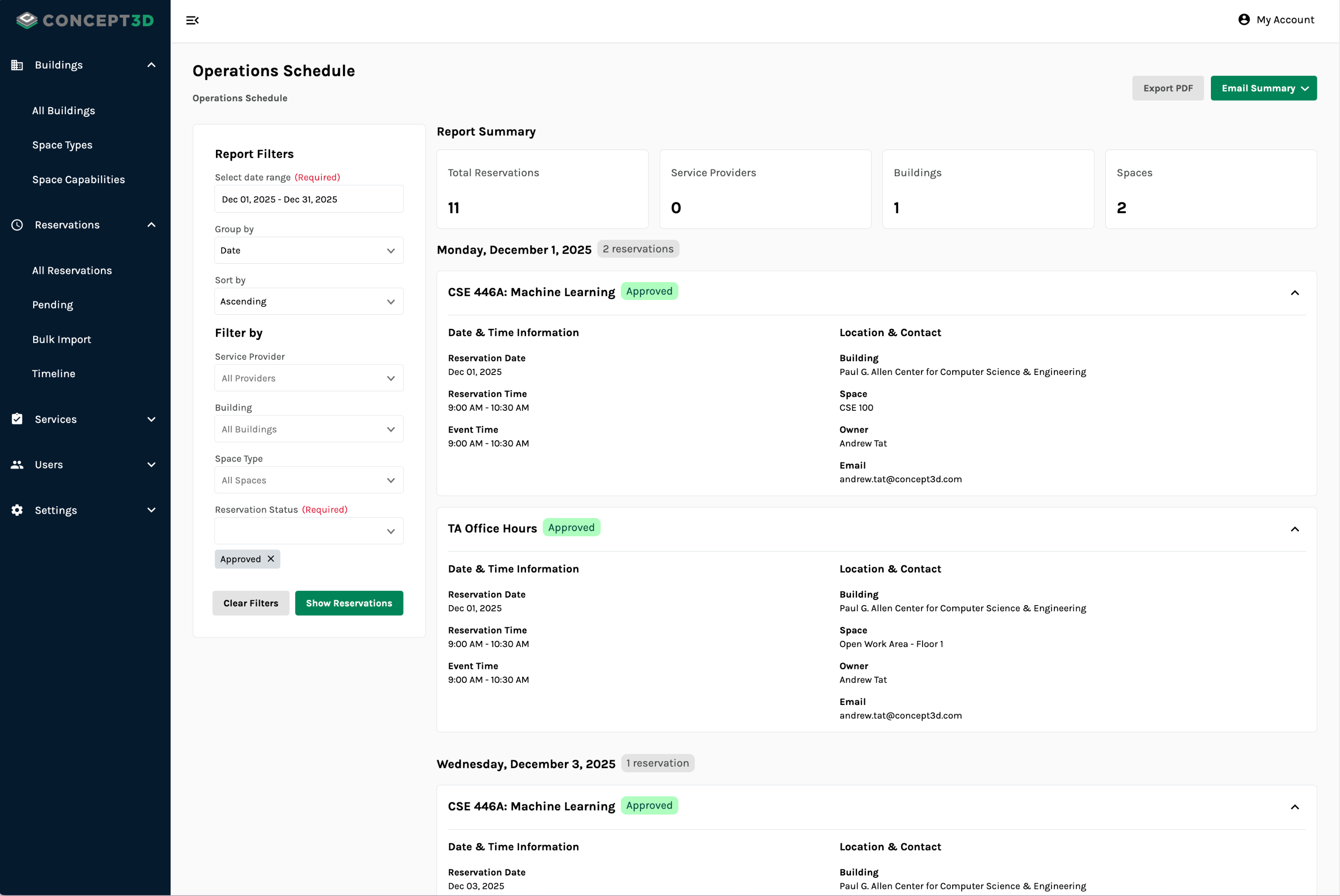
Event Coordinators can now generate on-demand, fully customizable reports of upcoming reservations to facilitate advance planning for events with service providers. This new tool is great to use weeks before big events on your campus, ensuring folks stay up to date on what they need to do for upcoming reservations.
This new Operation Schedule Report allows you to…
Plan Ahead with Flexible Filtering
- Select date ranges up to 3 months to plan for upcoming events
- Filter by specific service providers, buildings, space types, and reservation statuses
Organize Information Your Way
- Group results by date to see daily schedules across all service providers
- Group results by service provider to see each provider’s upcoming assignments
- Choose your sort order for easy readability
- View high level metrics around total events, service providers, buildings, and spaces within your selected timeframe
See Comprehensive Reservation Details
- Get all relevant details about the reservation, including dates, times, buildings, spaces, reserver’s contact information, and assigned service providers and resources
Share and Distribute Reports
- Export these reports as a PDF to print or share internally with stakeholders
- Email the report to yourself to confirm details before sharing further
- Email targeted reports to assigned service providers and ensure each provider gets only information relevant to them
Usability Updates
- Reservation owners now automatically receive email notifications when an admin updates their reservation, ensuring everyone stays informed of changes
- The date picker for Reserver’s timeline view now correctly highlights the currently displayed week
October 23, 2025
New Features
Space Capabilities
“Allowed Use” is now Space Capabilities, allowing you to define and manage the specific features, equipment, and characteristics of your spaces. Facilities Managers can now create 3 types of Space Capabilities and choose the order in which they display:
- Checkbox - Enable or disable the capability for spaces. Great for simple things like WiFi.
- Single Select - Select the one option that best describes the capability for specific spaces. Great for things like noise level policies.
- Multi-Select - Select all capabilities that apply to the space. Great for things like accessibility accommodations and permanent equipment like whiteboards and podiums.
This system provides an easy way to define what each space offers, helping users find and reserve spaces that exactly meet their event needs.
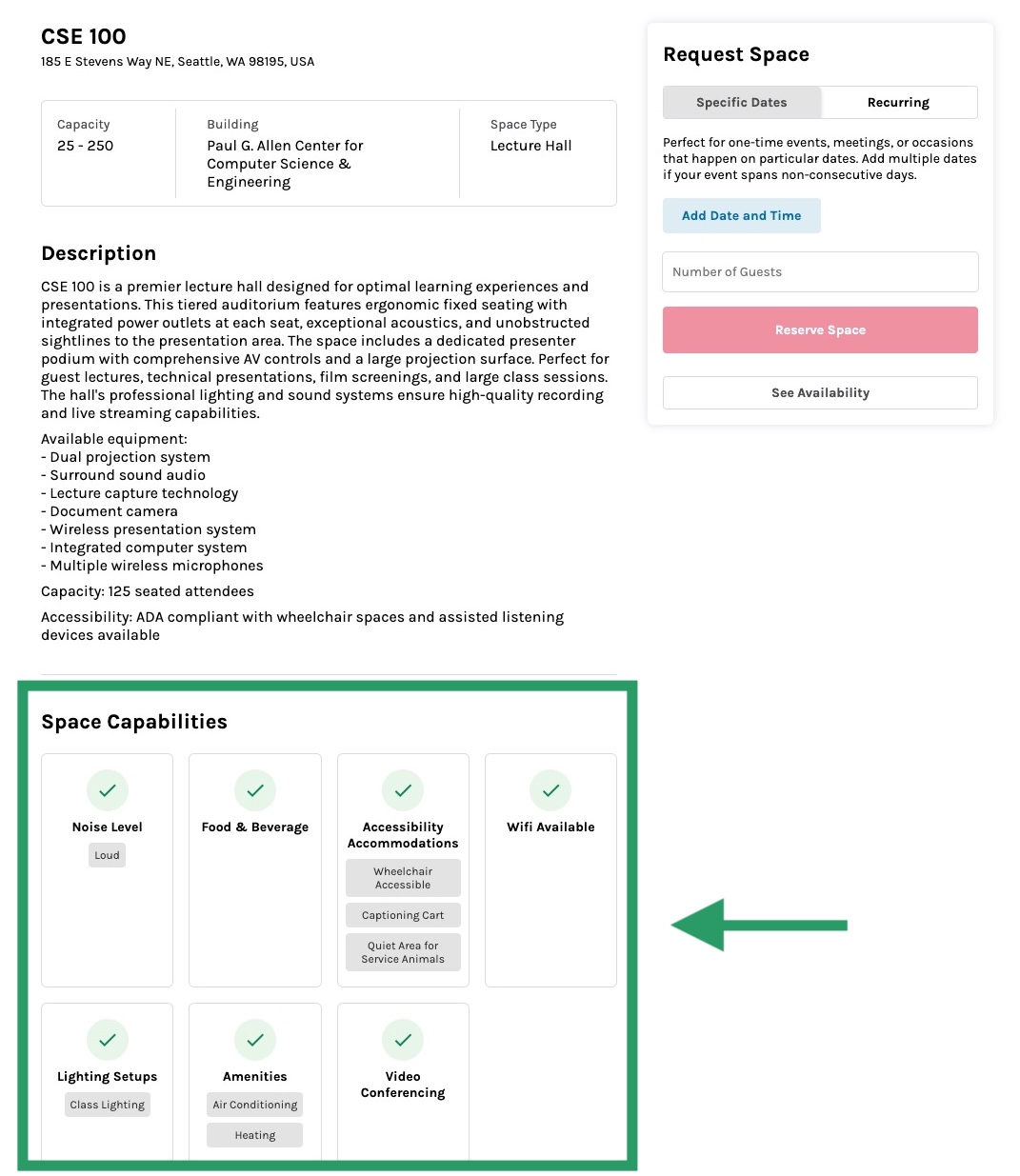
Space Capabilities provide more information when users visit space pages to find more details.
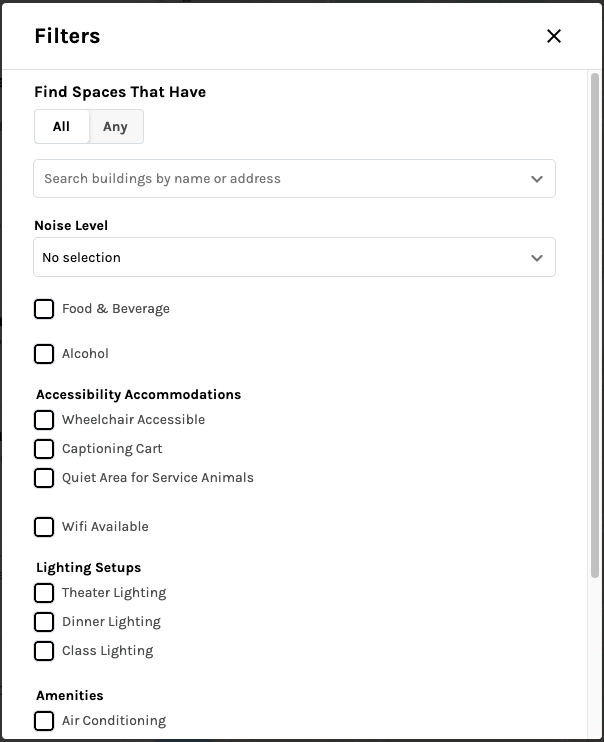
Reservers can filter for spaces with specific Space Capabilities they’re looking for for their reservation or event.
New Tools for Reservations Management
Reservation groups are great for multi-day and recurring reservations, great for classes and recurring meetings. We’ve updated how reservation groups are displayed and managed throughout the platform, giving both Admins and Reservers better visibility into each individual reservation within a group while maintaining the convenience of managing them together.
You now have greater flexibility to handle scheduling exceptions. Need to edit or cancel just one date in a recurring series due to a holiday? No problem, you can now cancel individual reservations within a group while keeping the rest intact.
Some other new management features:
Detailed table displays each reservation separately with its own date, time, and status
- Reservation groups automatically calculate an accurate group status to reflected the combined state of all reservations
- Event Coordinators can now edit the date and time for existing reservations when events need to be rescheduled due to conflicts, weather, or other circumstances.
- Reservation owners now receive email notifications when individual reservations within a group are approved or rejected.
- Service Providers receive email notifications when previously approved reservations are cancelled or rejected, letting them know their services are no longer needed.
- For more information on managing reservations and reservation groups, check out our support site.
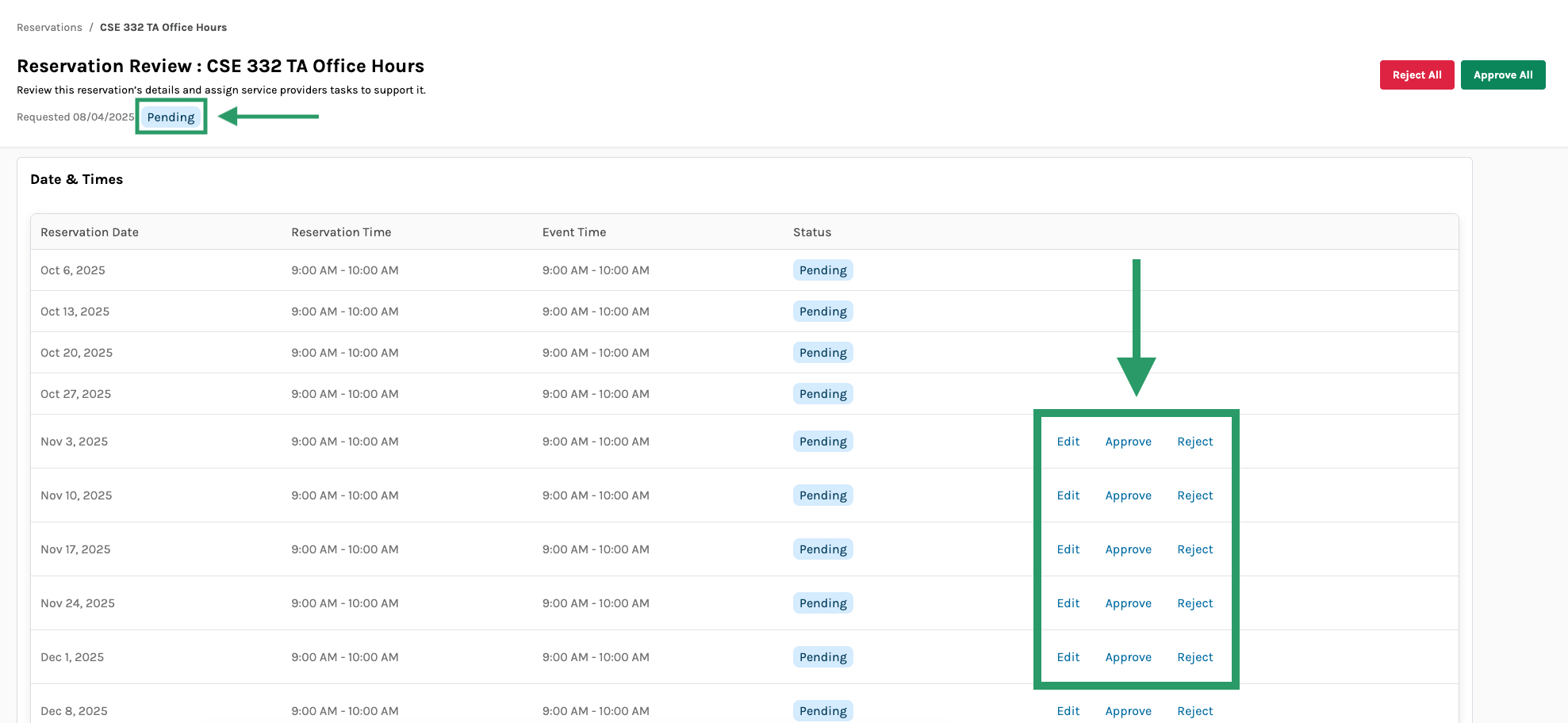
Reservation Groups have their own status that updates depending on how related, individual reservations are approved, rejected, or reviewed.
Edit Reservations via Timeline View
Admins can now edit reservation times directly on the timeline view by clicking and dragging the start, end, or entire reservation block. This provides a faster, more intuitive way to adjust reservation times.
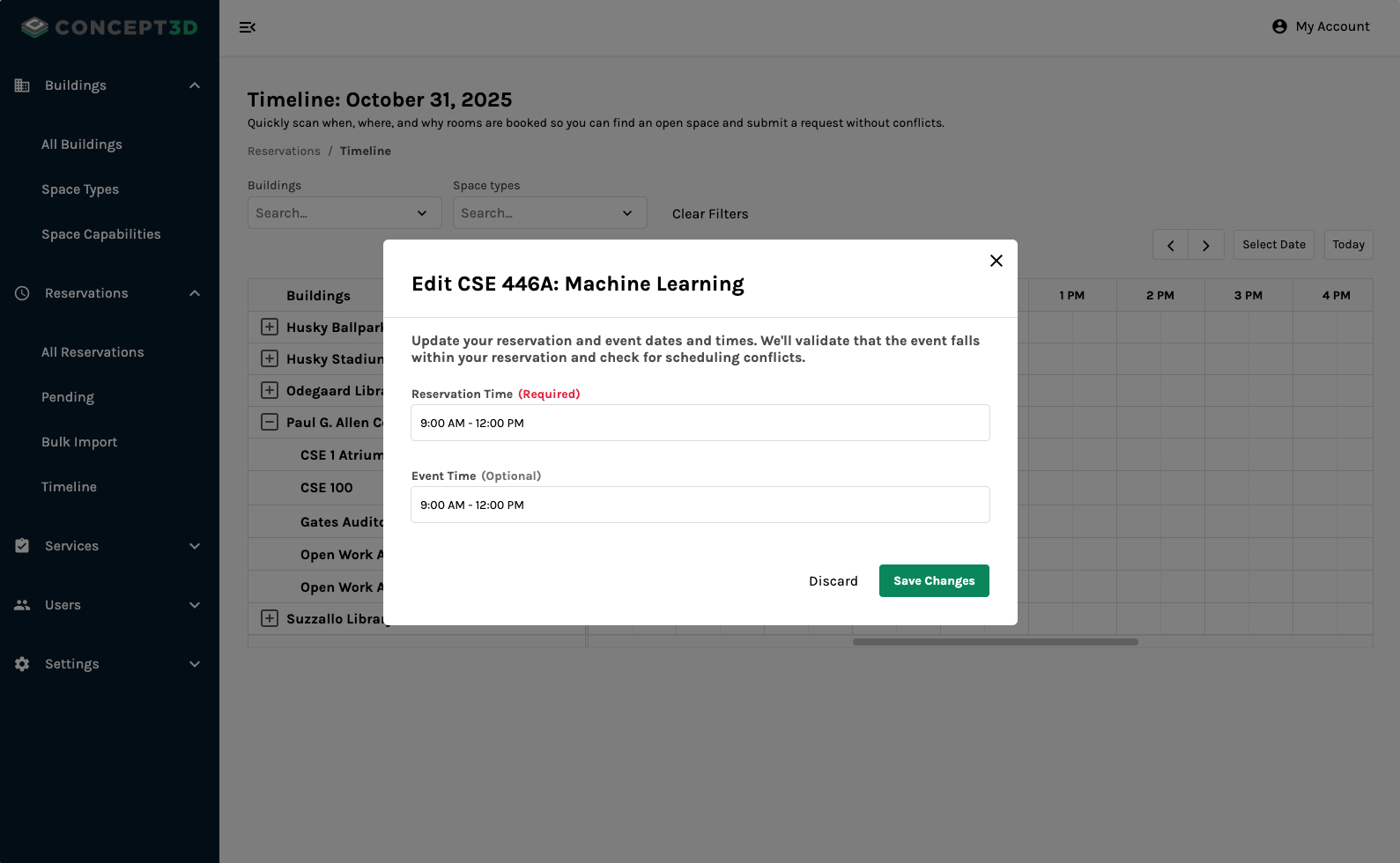
Admins can confirm any edits they make to reservations on the timeline view.
Automatic Invoice Updates for Reservation Changes
When you modify the reservation time, any unpaid invoice automatically updates the relevant quantities and costs, recalculating amounts for items charged 'per hour' based on the new duration.
If you cancel or reject an individual reservation within a group, all associated space, service provider, and resource items are removed from the invoice. PDF invoices will display the updated totals after the invoice is re-downloaded or resent.
October 15, 2025
New Features
Invoicing
You now have access to a comprehensive invoicing system to streamline billing for room reservations. Event Coordinators can now create, customize, and send professional invoices directly from the platform, with costs automatically calculated based on spaces, resources, and services providers used. There are a few key features introduced with Invoicing:
- Invoice status is accurately tracked throughout the payment lifecycle: drafting, sending, and marking the invoice as paid
- Invoices have due dates and will automatically update to overdue when payment hasn’t been received
- Invoices include auto-incrementing numbers for easy tracking and organization
-
Facilities Managers can configure default costs for all Spaces, Resources, and Service Providers in the platform
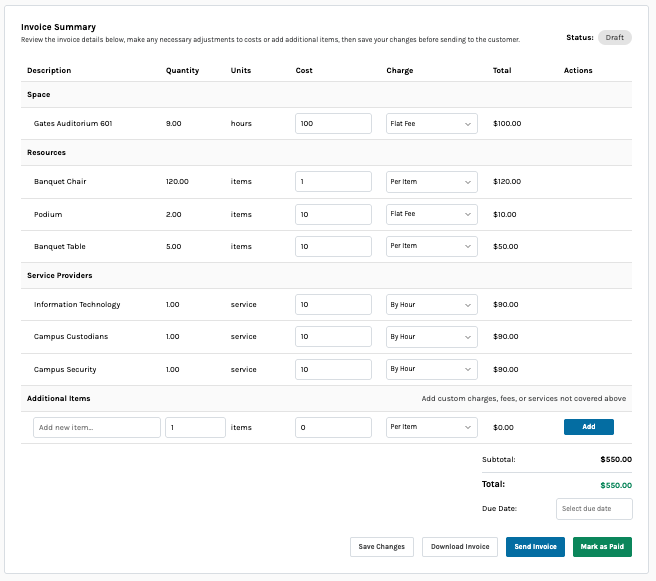
Invoices can be edited, downloaded, sent, and updated while reviewing reservations.
Usability Updates
- New “Past” tab for viewing reservation lists in both Admin and Reserver experiences
- Pending and Upcoming tabs now display only future reservations